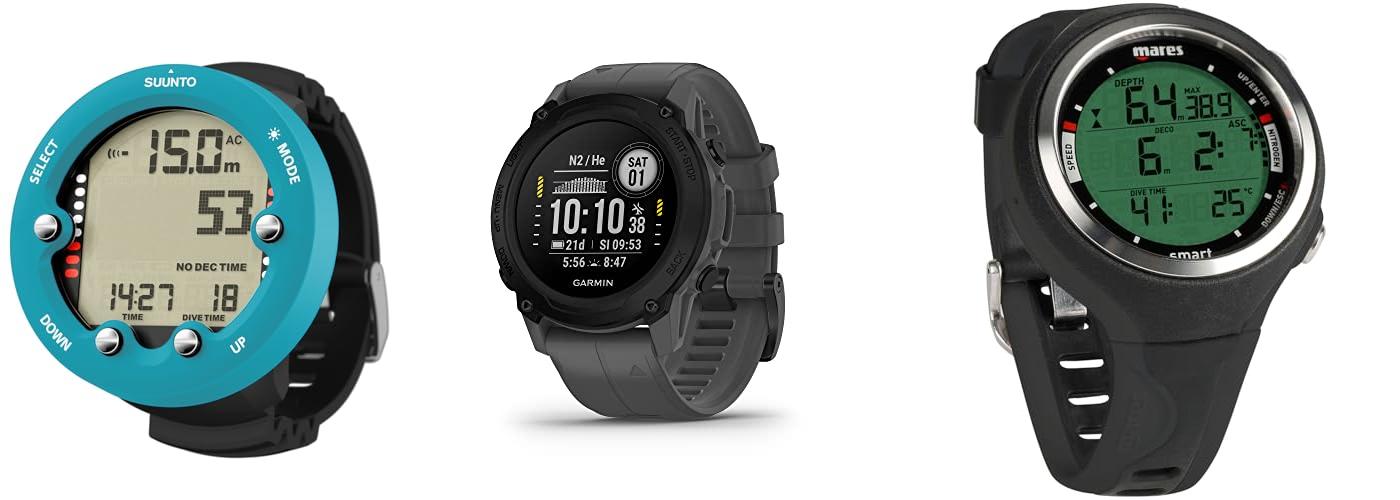
Imagine this: you’ve just completed your open water certification, and the underwater world is calling your name. You’re excited to explore reefs and swim with fish, but then you look at your dive buddy’s wrist. They’re sporting a sleek dive computer, and suddenly you realize you’re missing a key piece of gear. The thought of picking out your first dive computer can feel overwhelming. There are so many brands and features, and the last thing you want is to buy the wrong one.
Choosing your first dive computer is a big step, and it’s totally normal to feel a little lost. You want something that’s easy to use, reliable, and won’t break the bank. But where do you even start? What does all that jargon mean? That’s where this guide comes in.
By reading on, you’ll learn exactly what to look for in a beginner dive computer. We’ll break down the essential features and help you understand which ones matter most for new divers. We’ll make choosing your first dive computer simple and stress-free, so you can focus on enjoying those amazing dives. Let’s dive in and find the perfect computer for your underwater adventures!
Our Top 5 Beginner Dive Computer Recommendations at a Glance
Top 5 Beginner Dive Computer Detailed Reviews
1. SUUNTO Zoop Novo Wrist Scuba Diving Computer

Rating: 9.0/10
The SUUNTO Zoop Novo Wrist Scuba Diving Computer in Aqua Blue is a fantastic tool for divers. It helps you stay safe and informed underwater. This computer is designed for both new and experienced divers. Its bright aqua blue color makes it easy to spot, even in the water.
What We Like:
- It offers four different operating modes: air, nitrox, gauge, and freedom. This means it can handle many types of dives.
- You can program it for oxygen mixtures from 21% to 50%. This makes it versatile for different diving needs.
- The computer can display information in imperial or metric units. You can choose what works best for you.
- It shows important decompression stop data. This helps you plan your ascent safely.
- Audible alarms alert you to important changes. You will always know if you need to pay attention.
- The backlit display is easy to read. This is great for low light or night diving conditions.
- It can track your depth up to 330 feet (100 meters). This covers most recreational diving.
What Could Be Improved:
- Some users might find the initial setup a bit complex. Reading the manual carefully is important.
- While it’s a great value, more advanced divers might want additional features not found here.
The SUUNTO Zoop Novo is a reliable and user-friendly dive computer. It provides essential safety information in a clear and accessible way, making your dives more enjoyable.
2. Garmin Descent™ G1

Rating: 8.8/10
The Garmin Descent™ G1 in Slate Gray is a tough dive computer built into a watch. It helps you explore the underwater world and track your adventures. It’s designed for serious divers but also great for everyday life.
What We Like:
- It’s super tough with a scratch-resistant sapphire lens and comfy silicone bands.
- You can dive for a long time with up to 25 hours of battery in dive mode.
- It uses GPS, GLONASS, and Galileo to mark where you enter and exit the water, so you always know your dive spots.
- With over 30 sports apps, you can track everything from swimming to running.
- It keeps an eye on your health with heart rate, Pulse Ox, and energy levels, reminding you to rest.
- You get smartwatch features like notifications and payments when connected to your phone.
- It stores up to 200 dives and works with the Garmin Dive app to share and find dive sites.
- It supports many types of diving, including free diving and spear fishing.
What Could Be Improved:
- The display is monochrome, which is easy to read but not as colorful as some other watches.
- Some advanced health features like Pulse Ox might not be available everywhere.
This watch is a fantastic companion for any diver, offering robust features for both underwater exploration and daily activity tracking. It’s a reliable tool that keeps you informed and connected.
3. Mares Smart Wrist Dive Computer

Rating: 9.3/10
The Mares Smart Wrist Dive Computer is a fantastic tool for any diver. It looks like a regular watch but has all the features you need underwater. It’s designed to be easy to use and see, even when you’re deep in the water. This computer works for both casual diving and more advanced technical diving.
What We Like:
- It handles Nitrox gases up to 99%, which helps you stay down longer safely.
- The screen is super clear and easy to read with big numbers for important info like depth and dive time.
- You can use it for scuba diving and also for freediving, with special alarms for freediving.
- The buttons on the side are simple to push, so you can easily check your maximum depth or dive time.
- You can easily download your dive logs to your computer and update the computer’s software to get new features.
What Could Be Improved:
- While it’s great for both, some super technical divers might want even more advanced features.
- Connecting to a computer might require a specific cable or Bluetooth adapter, which isn’t always included.
The Mares Smart Wrist Dive Computer is a reliable and versatile companion for your underwater adventures. It offers excellent value for its features.
4. Cressi Scuba Diving Console for Beginners – 4-Dive Modes: Air • Nitrox • Gauge • Free – Long Battery Life – Strong Backlit Display – Console Donatello 2: Made in Italy

Rating: 9.4/10
Dive into your underwater adventures with the Cressi Console Donatello 2, a smart and reliable companion for beginner scuba divers. This console combines a user-friendly dive computer with a crucial pressure gauge, all designed for safe and easy exploration. Its Italian craftsmanship ensures quality and performance.
What We Like:
- It offers four dive modes: Air, Nitrox, Gauge, and Free, making it versatile for different diving styles.
- The single-button operation simplifies setting up and navigating through dive information, perfect for those new to diving.
- Its high-definition screen displays large, clear numbers, so you can easily read all vital data.
- The console has two handy connection points and wide strap loops, giving you flexible ways to wear it.
- An angled design makes it comfortable to hold and positions the display for the best view.
- The rugged pressure gauge features a chrome-plated brass case and color-coded markings for quick and easy pressure readings up to 350 BAR / 5000 PSI.
- With its long battery life and strong backlit display, you can dive with confidence in various conditions.
What Could Be Improved:
- While great for beginners, more advanced divers might seek additional features not found on this model.
- The 65mm x 25mm size, while compact, might be a little small for some users’ preference.
The Cressi Console Donatello 2 is an excellent choice for new divers, offering essential features in a durable and easy-to-use package. It’s built to help you explore the underwater world safely and enjoyably.
5. Cressi Goa Scuba Diving Computer

Rating: 8.6/10
The Cressi Goa Scuba Diving Computer in Black/Blue is a new dive computer built from the ground up. It’s packed with new features and designed for ease of use, making it a great choice for divers of all levels.
What We Like:
- It has a faster new CPU that gives it more features.
- The battery is bigger, so it lasts a long time.
- It has a small case and a clear, bright display that’s easy to read.
- The screen is made of strong mineral glass, and the case is tough.
- Steel buttons are built to last and work underwater up to 393 feet.
- With only two buttons, the menu is super simple to understand.
- It has programs for both scuba diving and freediving, with custom alarms.
- An “Off mode” stops unwanted alarms when you’re snorkeling or swimming.
- The Goa uses the RGBM Algorithm and lets you switch between Air and Nitrox.
- You can even switch between Nitrox and Air during a dive.
- It’s great for dives that need multiple decompression stops.
- Alarms warn you about ascent speed, decompression, or too much oxygen.
- It records data faster, giving you more accurate dive charts.
- It also records temperature for a more complete picture of your dive.
- You can download your dive data to your smartphone using a Bluetooth interface.
- Cressi, a leader in diving gear, designed and made this computer in Italy.
What Could Be Improved:
- The BT Interface for smartphone connection is sold separately.
This Cressi Goa computer offers great performance and user-friendly features. It’s a solid choice for anyone looking for a reliable dive buddy.
Your First Dive Computer: A Complete Buying Guide
So, you’re ready to dive into the amazing world of scuba diving and want a reliable dive computer to guide you. That’s a smart move! A dive computer is like having a smart buddy on your wrist, keeping track of all the important stuff so you can focus on the incredible underwater world. Let’s break down what makes a great beginner dive computer.
Key Features to Look For
When you’re starting out, you want a computer that’s easy to use and gives you the essential information.
- Dive Log: This is super important! It records your dives, like how deep you went, how long you stayed down, and your surface intervals (the time you spend out of the water between dives).
- Depth Gauge: This tells you your current depth and your maximum depth for the dive. Knowing your maximum depth is crucial for safe diving.
- Dive Time: It tracks how long you’ve been underwater. This helps you stay within safe limits.
- No-Decompression Limit (NDL): This is a lifesaver! It shows you how much longer you can stay at your current depth without needing to do decompression stops on the way up.
- Ascent Rate Indicator: This is a visual or audible warning if you’re coming up too fast. Ascending too quickly can be dangerous.
- Temperature Gauge: Most dive computers will also tell you the water temperature, which is handy for knowing if you need that extra bit of warmth.
- Easy-to-Read Display: Look for a screen that’s bright and clear, even in low light conditions underwater. Big numbers are your friend!
- Simple Controls: You don’t want to be fumbling with complicated buttons when you’re underwater. Simple, intuitive controls are best for beginners.
Important Materials
The materials used in a dive computer affect its durability and how it feels on your wrist.
- Casing: Most dive computers have a strong plastic casing. This is good because it’s tough and lightweight. Some higher-end models might use metal, but for beginners, durable plastic is perfectly fine.
- Strap: A comfortable and secure strap is important. Silicone or rubber straps are common because they are waterproof and flexible. Make sure it can be adjusted easily.
- Screen Cover: The screen needs to be protected from scratches. Look for a hardened plastic or mineral glass cover.
Factors That Improve or Reduce Quality
A few things can make a dive computer better or not so great.
- Build Quality: A well-built computer feels solid and sturdy. It shouldn’t feel flimsy.
- Brand Reputation: Stick with well-known brands that have a good track record for making reliable dive gear. They often have better customer support too.
- Battery Life: How long the battery lasts is important. Some computers have easily replaceable batteries, which is a big plus. Others might need to be sent in for battery changes.
- Water Resistance: All dive computers are designed to be waterproof, but checking the depth rating is a good idea, even for recreational diving.
- Software Updates: Some advanced computers can be updated with new features. While not essential for beginners, it’s something to consider if you plan to dive a lot.
User Experience and Use Cases
A beginner dive computer should make your diving experience smoother and safer.
- Ease of Use: The best beginner computers are easy to set up and understand. You can check your dive time and depth quickly without having to think too hard.
- Comfort: It should be comfortable to wear for extended periods, both in and out of the water.
- Versatility: While you’re a beginner now, think about if the computer can grow with you. Some computers can switch to different dive modes, like nitrox diving (using a higher percentage of oxygen in your air tank), if you decide to get certified for it later.
- Safety First: Ultimately, the best computer is one that helps you dive safely and confidently. It should give you clear warnings and information so you can enjoy your dives.
Frequently Asked Questions for Beginner Dive Computers
Q: What is the most important thing a dive computer does for a beginner?
A: The most important thing is tracking your no-decompression limit (NDL). This tells you how much longer you can stay at your current depth safely.
Q: Do I really need a dive computer? Can’t I just use a dive watch and a depth gauge?
A: While you can use a separate dive watch and depth gauge, a dive computer calculates all that information together in real-time. This makes it much easier and safer to manage your dive profile.
Q: Are dive computers difficult to learn how to use?
A: For beginners, it’s best to choose a computer with a simple interface. Most beginner models are designed to be user-friendly, with clear displays and straightforward buttons.
Q: What does “Nitrox compatible” mean, and do I need it as a beginner?
A: Nitrox compatible means the computer can be used with enriched air nitrox (air with more oxygen). You don’t need it for your very first dives, but it’s a good feature if you plan to get certified for nitrox diving later.
Q: How do I know if the dive computer is waterproof enough?
A: Dive computers are built to withstand underwater pressure. Look for one with a good depth rating (usually 100 meters or more) to ensure it’s suitable for recreational diving.
Q: How often do I need to change the battery?
A: Battery life varies by model. Some last for years, while others might need changing every year or two. It’s good to know if the battery is easily replaceable yourself or if it needs to be sent to a service center.
Q: Can I use my dive computer for snorkeling?
A: Yes, many dive computers can also be used for snorkeling. They will track your depth and time while you’re on the surface or in shallow water.
Q: What’s the difference between an air-integrated dive computer and a non-air-integrated one?
A: An air-integrated computer connects to your scuba tank and also tracks your air pressure. A non-air-integrated computer only tracks your dive profile, and you would need a separate submersible pressure gauge (SPG) to check your air.
Q: Is it better to get a wrist-mount or console-mount dive computer?
A: Wrist-mount computers are the most common for beginners because they are like wearing a watch. Console-mount computers are attached to your regulator hose.
Q: How do I take care of my dive computer?
A: After each dive, rinse your computer with fresh water to remove salt and sand. Store it in a cool, dry place away from direct sunlight. Avoid dropping it.
In conclusion, every product has unique features and benefits. We hope this review helps you decide if it meets your needs. An informed choice ensures the best experience.
If you have any questions or feedback, please share them in the comments. Your input helps everyone. Thank you for reading.

Hi, I’m Hector Quintanilla, the creator of helmetslab.com.. As a passionate enthusiast and experienced expert in helmets, I’ve dedicated this platform to sharing my insights, knowledge, and hands-on experiences. Whether you’re seeking the best helmet for safety, comfort, or performance, my goal is to guide you with detailed reviews, tips, and advice. Ride safe, and let’s explore the world of helmets together!